How Marabou works
Marabou has five tabs along the bottom: Nearby, Chats, Discover, Pulse and Profile. This page walks through all of them, then explains likes, matches, credits and VIP Plus.
On this page
1. Signing up
You sign in with Google or an email address, then build a profile: photos, date of birth, gender, and what you are looking for. Everything after that — bio, prompts, job, school, height, languages, interests, lifestyle answers — is optional, and you can change or clear any of it later from Edit Profile.
You must be 18 or over. Your date of birth is used to calculate your age; other members only ever see the age, never the date.
2. Discover — the swipe deck
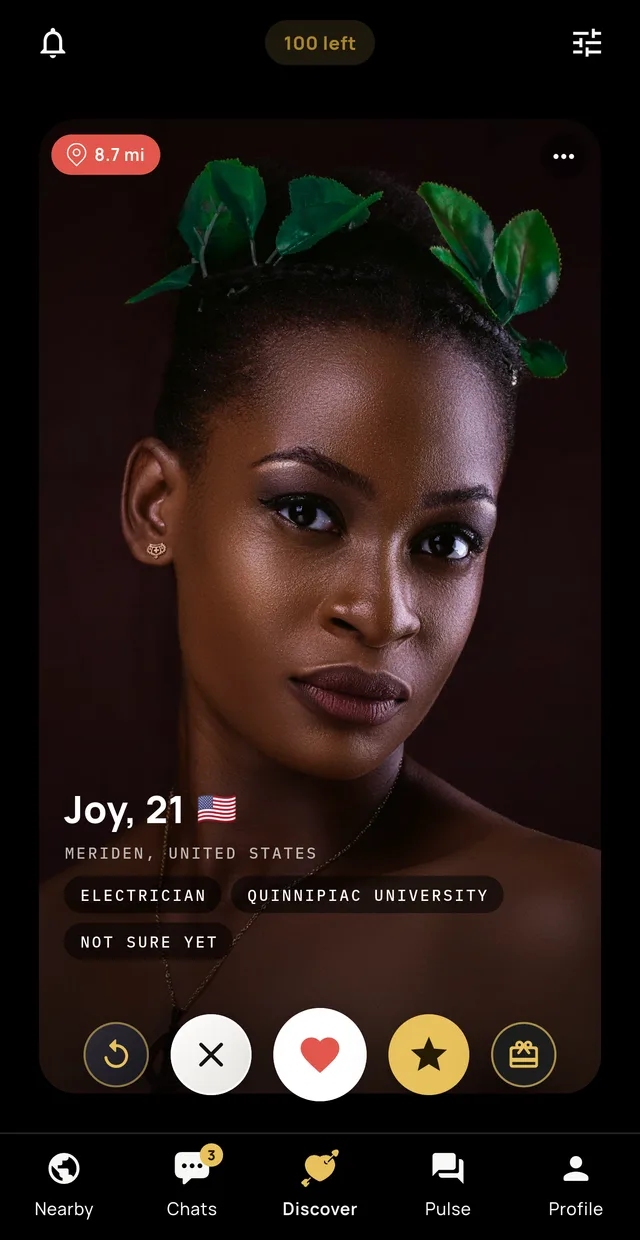
A stack of profile cards, one at a time. Each card shows their photo, first name, age, distance, and up to three details — job, school, what they are looking for. Tap the card to open the whole profile without losing your place.
- Swipe left / ✕
- Pass. Free and unlimited — passing never costs you anything.
- Swipe right / ♥
- Like. Uses one of your daily likes.
- Swipe up / ★
- Super Like. They are told you super liked them, which puts you at the front of their attention.
- ↺ Rewind
- Brings back the profile you just passed.
- 🎁 Gift
- Sends a digital gift — the strongest opener there is.
The counter at the top shows how many likes you have left today. Use the filter icon to set age, distance and the rest.
3. Nearby — who is around you
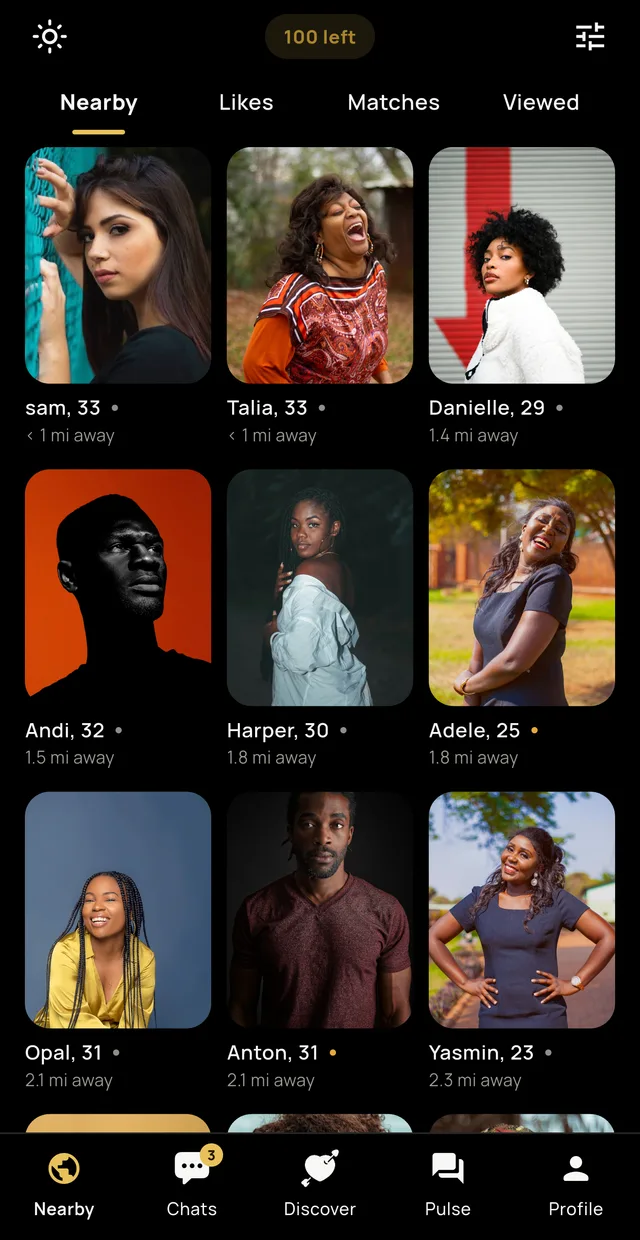
A grid of people near you, closest first, with real distances — under a mile, 1.4 miles, and so on. A coloured dot shows who is online now. Tap any photo to open their full dating profile as a card, with the same five actions as the deck.
Distances follow your unit preference, miles or kilometres. Nearby needs location permission; without it the rest of the app still works.
4. Likes, Matches and Viewed
Four tabs sit across the top of Nearby — the grid itself, then:
- Likes
- People who liked you. On the free plan these are blurred — see below.
- Matches
- Everyone you have matched with. Tap to open the chat.
- Viewed
- People who opened your profile. Also blurred on the free plan.
Revealing a blurred profile
There are three ways, and you choose:
- Upgrade to VIP Plus — every liker and viewer is visible, immediately and permanently.
- Watch a few optional rewarded videos to reveal one specific person. Your progress is saved if you stop, and the person does not disappear.
- Do nothing. If they liked you and you like them back in Discover, you match anyway — for free, as always.
Rewarded videos are never required. They are a way to spend time instead of money, and nothing in Marabou is locked behind watching one. A profile you unlock stays unlocked, and unlocking someone from Likes also unlocks them in Viewed.
5. Chats
You can message someone once you match. New matches appear at the top, and the chat list shows the latest message from each conversation.
- Photos
- Send from the camera or your library.
- Gifts
- Send a digital gift from inside the chat.
- Translate
- Translate a message into your language. This happens on your phone — the text is never sent to us or to a translation service.
- Unsend
- VIP Plus: take back a message within 24 hours.
- Timed photos
- VIP Plus: photos that disappear 5 or 10 seconds after being opened.
- Unmatch
- Ends the match and removes the conversation.
Free matches expire after 24 hours if nobody says anything. It is there so matches turn into conversations instead of collecting. VIP Plus removes the timer.
6. Pulse — the community feed
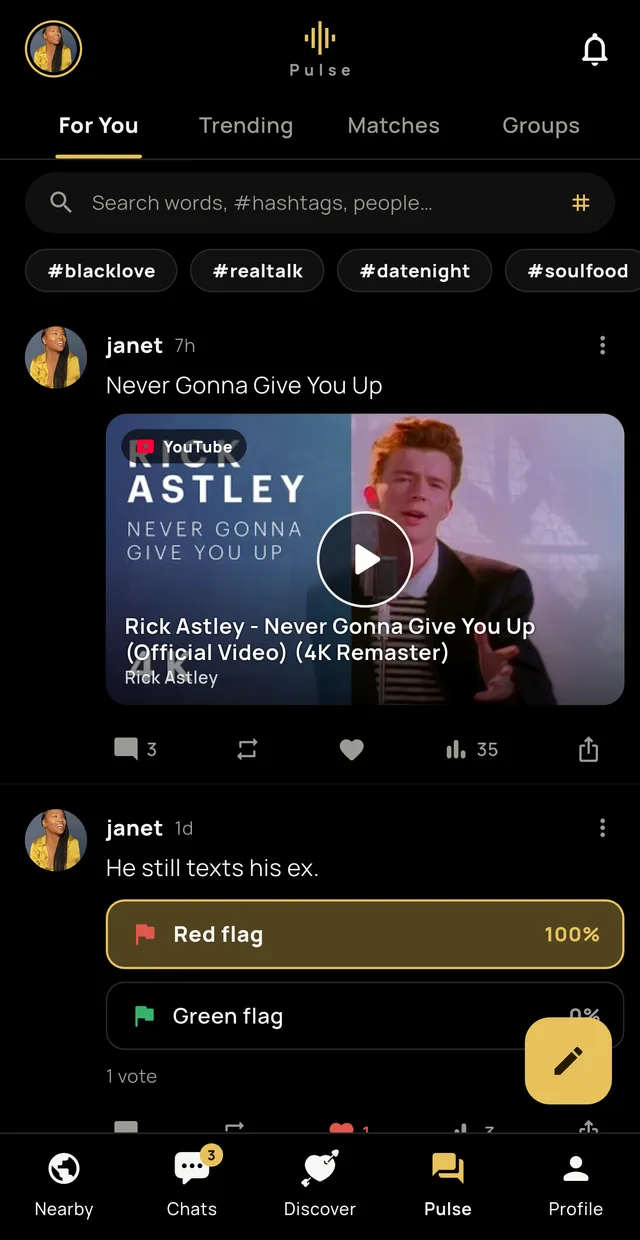
Pulse is a feed inside Marabou. You do not need to match with someone to see their posts or follow them, which makes it the easiest way to meet people through what they think rather than only how they photograph.
- For You
- Posts from across Marabou.
- Trending
- What is getting attention right now.
- Matches
- Posts from people you have matched with.
- Groups
- Topic spaces you can join.
You can post text, photos, GIFs, polls, places and hashtags. You can reply, repost, like and save. Tap someone's photo to open their profile; tap + to follow them.
Privacy on Pulse
- Set your Pulse account to private and only followers you approve can see your posts. Follow requests arrive in notifications, and you accept or decline.
- Posts and comments are screened before they publish. Slurs, hate speech, threats and explicit sexual content are blocked at the moment you press post. Content that is borderline — much harassment falls here — publishes and is queued for human review instead.
- You can edit or delete your own posts and comments at any time.
7. Profile & Shop
The Profile tab has four sections:
- Shop
- Your plan, your credit balance, Super Likes, Rewinds, gifts and VIP Plus.
- Account
- Edit profile, download your data, delete your account.
- Preferences
- Who you want to see, distance, units, language, theme.
- Safety
- Blocked members, safety tips, and reporting.
The percentage next to your photo is how complete your profile is. Fuller profiles get better conversations, not just more of them.
8. Daily likes
| Free | VIP Plus | |
|---|---|---|
| Likes | 100 per day | Unlimited |
| Passing | Unlimited | Unlimited |
| Super Likes | 5 per month | 15 per month |
| Rewinds | Buy with credits | 15 per month |
| Search distance | Up to 100 miles | No limit — plus Passport |
Your likes reset every day. Passing costs nothing — only likes are counted, so you never have to ration saying no. Sending a gift to someone you have not matched with counts as a like, because that is what it is.
9. Marabou Credits
Credits are the in-app currency. They buy Super Likes, Rewinds and digital gifts, and can be put towards VIP Plus.
- Buy them in packs, from the + next to your balance.
- Put them towards VIP Plus — available once your free trial has been used.
- Earn them free by watching optional rewarded videos, on the same screen.
Credits have no cash value, cannot be transferred between accounts, and are lost if the account is deleted. Gifts cost between 1 and 15 credits, so the cheapest is a handful of videos away if you would rather not pay.
10. VIP Plus
| Perk | What it does |
|---|---|
| See who likes you | Every liker and viewer, unblurred |
| Unlimited likes | No daily cap |
| No adverts | The whole app, ad-free |
| 15 Super Likes and 15 Rewinds a month | Included, not bought |
| Incognito mode | Only people you like or match with can see you |
| Matches never expire | No 24-hour countdown |
| Unsend messages | Within 24 hours |
| Timed photos | Vanish after 5 or 10 seconds |
| Screenshot protection | On your profile and chats |
| Passport | Browse another city |
VIP Plus is sold in several durations, and the longer plans cost less per month. It renews automatically until you cancel, which you do in Google Play or the App Store — not in Marabou. See the Terms.
11. Gifts
A digital gift lands in the other person's chat with your name on it. They cost 1 to 15 credits.
If you are not matched with the person, sending a gift also registers a like and uses one of your daily likes — the gift is an opener, and it should say so honestly. If they have already liked you, it makes the match immediately. If you are already matched, a gift is just a gift.
12. Safety tools
- Block
- Immediate, both directions. They are not told.
- Report
- Confidential. Reviewed by us.
- Unmatch
- Ends the conversation.
- Screening
- Slurs, hate speech and explicit content blocked before publishing; borderline content queued for review.
- Appeals
- If a filter is wrong, request a review and a person looks at it.
Read the Dating Safety Tips before meeting anyone.
13. Languages
Marabou is fully available in English, Español, Français, Kreyòl Ayisyen and Português. Change it any time in Profile → Preferences. Message translation is separate, works on your device, and covers many more languages.
14. Your account and data
- Download your data — Profile → Account. You get a file with your profile and activity.
- Delete your account — Profile → Account. It is immediate and permanent: profile, photos, likes, matches and messages, including the copies on the other person's side.
- Deleting the app does not delete your account, and does not cancel a subscription.